
Proxmox Backup Server PBS enlarge root disk
How to enlarge an EXT4 or LVM disk on an PBS Proxmox VM
Quick TL;DR Guide
- First resize the disk in Proxmox
- Then in the PBS VM terminal:
parted /dev/sdX (probably a) example
print / yes to fix / resizepart Y (probably 1)parted /dev/sda
quit - resize2fs /dev/sdXY
- df -h
Longer Guide with Explanation
First resize the disk in Proxmox:
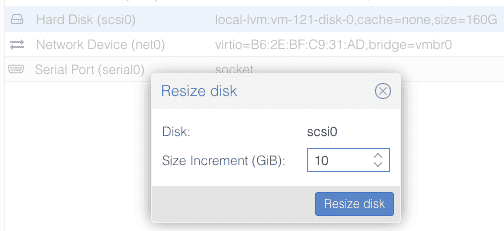
At this point you need to START the PBS VM and enter the shell as root follow the below instractions.
fdisk -lshould show which disks are there.
Disk /dev/sda: 50 GiB, 53687091200 bytes, 104857600 sectors
Disk model: QEMU HARDDISK
Units: sectors of 1 * 512 = 512 bytes
Sector size (logical/physical): 512 bytes / 512 bytes
I/O size (minimum/optimal): 512 bytes / 512 bytes
Disklabel type: gpt
Disk identifier: XXXXXXXX-XXXX-XXXX-XXXX-XXXXXXXXXXXX
Device Start End Sectors Size Type
/dev/sda1 34 2047 2014 1007K BIOS boot
/dev/sda2 2048 1050623 1048576 512M EFI System
/dev/sda3 1050624 104855551 103804928 31.5G Linux LVM
Disk /dev/mapper/pbs-swap: 3.82 GiB, 4106223616 bytes, 8019968 sectors
Units: sectors of 1 * 512 = 512 bytes
Sector size (logical/physical): 512 bytes / 512 bytes
I/O size (minimum/optimal): 512 bytes / 512 bytes
Disk /dev/mapper/pbs-root: 27.67 GiB, 49039802368 bytes, 95780864 sectors
Units: sectors of 1 * 512 = 512 bytes
Sector size (logical/physical): 512 bytes / 512 bytes
I/O size (minimum/optimal): 512 bytes / 512 bytes
If you get this message which seems like an error, the resize in Proxmox worked:
GPT PMBR size mismatch (167772159 != 314572799) will be corrected by write.The backup GPT table is not on the end of the device. This problem will be corrected by write.
The example above is resizing from 30 GB to 50 GB.
Now we still have to resize the file system from inside the PBS VM cli terminal :
lsblkYou should see something like the below.
NAME MAJ:MIN RM SIZE RO TYPE MOUNTPOINTS
sda 8:0 0 50G 0 disk
├─sda1 8:1 0 1007K 0 part
├─sda2 8:2 0 512M 0 part
└─sda3 8:3 0 31.5G 0 part
├─pbs-swap 252:0 0 3.8G 0 lvm [SWAP]
└─pbs-root 252:1 0 27.7G 0 lvm /
The run the below command to resize the sda3
lvextend -l +100%FREE /dev/mapper/pbs-root
resize2fs /dev/mapper/pbs-root
Check that root disk resize all free space
df -hOutput should be something like this.
Filesystem Size Used Avail Use% Mounted on
udev 3.9G 0 3.9G 0% /dev
tmpfs 795M 720K 794M 1% /run
/dev/mapper/pbs-root 45G 26G 18G 59% /
tmpfs 3.9G 0 3.9G 0% /dev/shm
tmpfs 5.0M 0 5.0M 0% /run/lock
tmpfs 795M 0 795M 0% /run/user/0
Now your PBS root disk is resize and have free space.
If you find this helpful or not please leave a comment.
Ins0mniA
No comments to display
No comments to display