# Proxmox Backup Server PBS enlarge root disk
##### How to enlarge an EXT4 or LVM disk on an PBS Proxmox VM
##### Quick TL;DR Guide
1. First resize the disk in Proxmox
2. Then in the PBS VM terminal:
parted /dev/sdX (probably a) example ```
parted /dev/sda
```
print / yes to fix / resizepart Y (probably 1)
quit
3. resize2fs /dev/sdXY
4. df -h
##### Longer Guide with Explanation
First resize the disk in Proxmox:
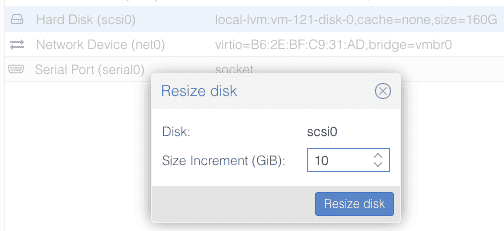
At this point you need to START the PBS VM and enter the shell as root follow the below instractions.
```
fdisk -l
```
should show which disks are there.
Disk /dev/sda: 50 GiB, 53687091200 bytes, 104857600 sectors
Disk model: QEMU HARDDISK
Units: sectors of 1 \* 512 = 512 bytes
Sector size (logical/physical): 512 bytes / 512 bytes
I/O size (minimum/optimal): 512 bytes / 512 bytes
Disklabel type: gpt
Disk identifier: XXXXXXXX-XXXX-XXXX-XXXX-XXXXXXXXXXXX
Device Start End Sectors Size Type
/dev/sda1 34 2047 2014 1007K BIOS boot
/dev/sda2 2048 1050623 1048576 512M EFI System
/dev/sda3 1050624 104855551 103804928 31.5G Linux LVM
Disk /dev/mapper/pbs-swap: 3.82 GiB, 4106223616 bytes, 8019968 sectors
Units: sectors of 1 \* 512 = 512 bytes
Sector size (logical/physical): 512 bytes / 512 bytes
I/O size (minimum/optimal): 512 bytes / 512 bytes
Disk /dev/mapper/pbs-root: 27.67 GiB, 49039802368 bytes, 95780864 sectors
Units: sectors of 1 \* 512 = 512 bytes
Sector size (logical/physical): 512 bytes / 512 bytes
I/O size (minimum/optimal): 512 bytes / 512 bytes
If you get this message which seems like an error, the resize in Proxmox worked:
`GPT PMBR size mismatch (167772159 != 314572799) will be corrected by write.`
`The backup GPT table is not on the end of the device. This problem will be corrected by write.`
The example above is resizing from 30 GB to 50 GB.
Now we still have to resize the file system from inside the PBS VM cli terminal :
```
lsblk
```
You should see something like the below.
NAME MAJ:MIN RM SIZE RO TYPE MOUNTPOINTS
sda 8:0 0 50G 0 disk
├─sda1 8:1 0 1007K 0 part
├─sda2 8:2 0 512M 0 part
└─sda3 8:3 0 31.5G 0 part
├─pbs-swap 252:0 0 3.8G 0 lvm \[SWAP\]
└─pbs-root 252:1 0 27.7G 0 lvm /
The run the below command to resize the sda3
```
lvextend -l +100%FREE /dev/mapper/pbs-root
resize2fs /dev/mapper/pbs-root
```
##### Check that root disk resize all free space
```
df -h
```
Output should be something like this.
Filesystem Size Used Avail Use% Mounted on
udev 3.9G 0 3.9G 0% /dev
tmpfs 795M 720K 794M 1% /run
/dev/mapper/pbs-root 45G 26G 18G 59% /
tmpfs 3.9G 0 3.9G 0% /dev/shm
tmpfs 5.0M 0 5.0M 0% /run/lock
tmpfs 795M 0 795M 0% /run/user/0
Now your PBS root disk is resize and have free space.
---
If you find this helpful or not please leave a comment.
**Ins0mniA**