
Empty ALL LOGs on a Linux Server
The below script is scan all the Linux Server from the [ / ] root folder of the system and all its sub directories for files with extension .log
Then it will make a file with filename "log-files-list.txt" and add line by line every log file it finds with it complete path.
After make the file "log-files-list.txt" then it takes line by line every log file and empty it, at then end it delete the file "log-files-list.txt".
Creating the script
Open the terminal and type the below command :
nano empty_log_files.shand then copy / paste the below code inside the file "empty_log_files.sh"
#!/bin/bash
clear
# Filename for log files list
LOG_FILE_LIST="log-files-list.txt"

# Function to find and list log files
find_log_files() {
    echo "Scanning for log files from /..."
    # Use find to locate files with `.log` extension
    find / -type f -name "*.log" > "$LOG_FILE_LIST"

    if [ $? -eq 0 ]; then
        echo "Log files found and saved to $LOG_FILE_LIST."
    else
        echo "Failed to search for log files."
        exit 1
    fi
}

# Function to empty log files
empty_log_files() {
    echo "Emptying the log files listed in $LOG_FILE_LIST..."
    # Read through the log file list and empty each log file
    while IFS= read -r log_file; do
        if [ -f "$log_file" ]; then
            > "$log_file" # Empty the log file
            echo "Emptied: $log_file"
        else
            echo "Warning: $log_file does not exist or is not a file."
        fi
    done < "$LOG_FILE_LIST"
}

# Main script execution
find_log_files
empty_log_files
rm log-files-list.txt
echo "Completed processing log files."
then press Ctrl + x it will prompt you [ Save modified buffer? ] press y and enter
Make the script executable
After that you need to make the script executable, so you will write the below command :
chmod +x empty_log_files.shAdd the script to cron job to run automatically
To run the script every 5 minutes follow the below steps, you can change the minutes according to your need.
crontab -ethen go at the end of the file and add the below line, change the your_path with your folder where the script is locate.
*/5 * * * * /your_path/empty_log_files.sh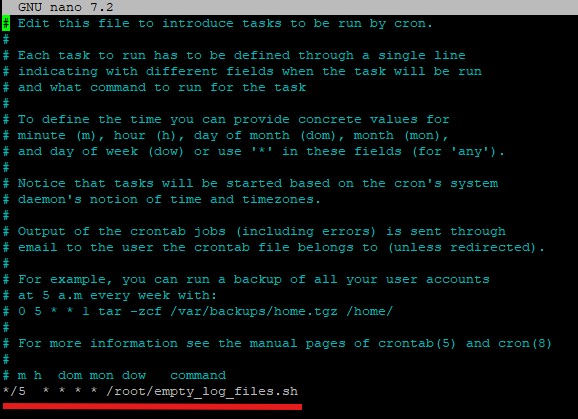
then press Ctrl + x it will prompt you [ Save modified buffer? ] press y and enter
You are done the script in the location /your_path/empty_log_files.sh it will autocatically run every 5 minutes.