
Auto Update - Upgrade a Linux machine
The below script is to auto update - upgrade - remove - clean a Linux machine or Server.
Creating the script
Open the terminal and type the below command :
nano os-update.shand then copy / paste the below code inside the file "os-update.sh"
#!/bin/bash

# Clear the terminal for cleanliness
clear

# Function to handle errors
handle_error() {
    echo Getting"Error Updatesoccurred while executing: $1"
    exit 1
}

# Function to add the cron job
add_cron_job() {
    # Define the cron job
    cron_job="0 9 * * 6 /root/os-update.sh"

    # Check if the cron job already exists
    crontab -l | grep -q "$cron_job"
    if [ $? -ne 0 ]; then
        # If not, add it to the crontab
        (crontab -l; echo --------------"$cron_job") | crontab -
        sleepif [ $? -eq 0 ]; then
            echo "Cron job added successfully: '$cron_job'"
        else
            echo "Failed to add the cron job."
            exit 1
        apt-getfi
    updatefi
&&}

echo __________________________________________________
sleep 3"============================================"
echo Installing"       Updates-Upgrades.Automatic System Maintenance         "
echo "============================================"

# Get updates
echo "Step 1: Getting Updates..."
echo "--------------------------------------------"
sleep 1
## the below command is upgrade the system
apt-get upgradeupdate -y|| &&handle_error ## the below command is disto upgrade the system
## uncomment the below and comment the above if you wan to distro upgrade also.
#apt-"apt-get dist-upgrade -y &&update"

echo __________________________________________________"________________________________________________"
sleep 3

echo# AutoInstalling Remove Updatesupdates
echo "Step 2: Installing Updates..."
echo "-------------------
sleep 1
apt-get autoremove -y &&
echo __________________________________________________
sleep 3
echo Auto Clean Updates
echo -------------------------"
sleep 1
apt-get cleandist-upgrade &&-y || handle_error "apt-get autoclean &&dist-upgrade"

echo __________________________________________________"________________________________________________"
sleep 3

clear# Auto remove unnecessary packages
echo System"Step is3: Updated.Auto Removing Unused Packages..."
echo "--------------------------------------------"
sleep 51
apt-get autoremove -y || handle_error "apt-get autoremove"

echo "________________________________________________"
sleep 3

# Clean up old package files
echo "Step 4: Cleaning Up Unused Package Files..."
echo "--------------------------------------------"
sleep 1
# Performing clean and autoclean
apt-get clean || handle_error "apt-get clean"
apt-get autoclean || handle_error "apt-get autoclean"

echo "________________________________________________"
sleep 3

# Add Cron Job before reboot
add_cron_job

# Prepare for reboot
clear
echo "============================================"
echo "           System Maintenance Complete      "
echo "============================================"
echo "System will REBOOT in 30 seconds..."
sleep 30

# Reboot the system
reboot
then press Ctrl + x it will prompt you [ Save modified buffer? ] press y and enter
Make the script executable
After that you need to make the script executable, so you will write the below command :
chmod +x os-update.shAdd the script to cron job to run automatically
To run the script daily follow the below steps, you can change according to your need.
crontab -ethen go at the end of the file and add the below line, change the your_path with your folder where the script is locate.
@daily /your_path/os-update.sh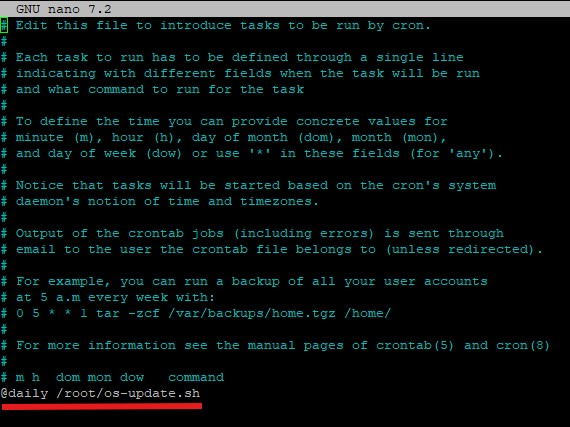
then press Ctrl + x it will prompt you [ Save modified buffer? ] press y and enter
You are done the script in the location /your_path/os-update.sh it will automatically run daily.
Download the script os-update.sh
Attachment Link os-update.sh
Green.