Amnisia VPN
Instructions for self-host, setup, configure and tweak a VPN server
- Amnezia VPN Client setup guide.
- Useful scripts for VPS VPN Servers
- Amnezia VPN Server settings
- Settings dnscrypt-proxy.toml
- Settings for resolv.conf
Amnezia VPN Client setup guide.
Downloading Amnezia VPN Client
Go to the below link and download the version for your OS your running.
https://amnezia.org/en/downloads
Android App
https://play.google.com/store/apps/details?id=org.amnezia.vpn
iOS App
https://apps.apple.com/us/app/amneziavpn/id1600529900
Setup client VPN key
After you download and install the app, open it and you will see the below screen.
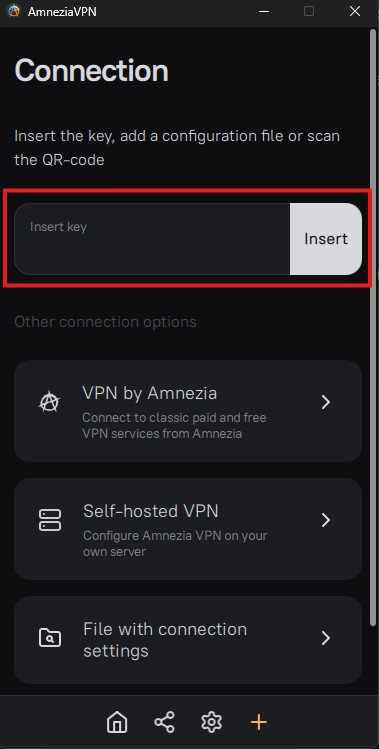
At that FIELD inside the RED spuare you will COPY - PASTE the KEY that youhave receive from your VPN provider.
The below is a KEY example, you should copy ALL THE TEXT of the key that you receive.
vpn://AASOVI5k1rEiqnMw6VeQ0zuUb6JAGH33VxjSt7qUO2rSB1wbq26VSrc3acwIo47KQAEvbeN_37koYJZ96KqJH-ec-W7zMfNVqZKP4IU4BQjDKxRBMF6He6gP0FRQs5gK7OaEPgcZcSsTXJAVw9QkQ5dUoVaiUZhG1U3ZMBRVKtWoVKObjbok1xuNUolGJYqsaXLdrEulbnoe05RSAdizGOULA4RZlqWsI_PsSjlWnVHKrUGSTkiHZ4i2T_hyMYVd0jWXPLuFvrlCLSOVI5k1rEiqnMw6VeQ0zuUtKpA970gWMdKSo7szKenFMYUi7Min0EXwmKxRBMF6He6gP0FRQtkxxzkniex7lXvmeLNJIY68ZZ68NYI47fo8yPYliELNMfDj5Y1pK6urgTGfDrdxp3Xr18F09rTcJ84obdxJ0nUhHe6EZHMqSqyLsqj9rYhitJ2s4AfXzQJzZ6yt1pO0XHadV3kXP-LL9-FI66iyiVuoH9e94Pky7L4kWbaa5q_9NnE0OdzHu4hTGM-DBN9fFlu_HMEmq19VTNVeqQvD2wCHYhT3q3lmjlwl5rFUvnJufw0H7-ExENikTpLAPP4j2W1W6uOeRNTQSHRIWntlgT2yd2o5MLZNaCrEMat1SrDDrBKFcYcAJorJ1p6kmgEYj5aPsYvIb2xDGtAH2ZrpGHi-h2w5l1W9Il5anBJ0IbKyRadsj2xq2A6nrByiVuoH9e94PkmtWPkwWIIY-X_04f4_uF-999Ny37ha_5Id9K2i9eM6w9bzsP_k73_rchEvg7V4lutris921afOzYa5V2fy6-Ab7UYhwSsi6KioK2ZuGIcqK1lR1XdVpeHLUoiQlM9KHMAJrtIW0UEoVtn4RJukABJBv_rmrgixIN6fDwjQKeJQFIUMIowkLczwA9KIujFMKs-RyNFnls_ut_uSeExhvYXz-Gnxro8hZcHBx2alKk6bHyiVuoH9e94PkMA2pduNHwpnwcL4uvwepGgQYfiLwg157mexQSOVI5k1rEiqnMw6VeQ0zuULFKEpRyK4XK8AoQSBjccLvT1MRlYbI_nStwPKbk03Z6WrNRoNS54MhVA6VPz-HBNgAfter you insert your key you will see a screen like the below and just press CONNECT to make your VPN connection.
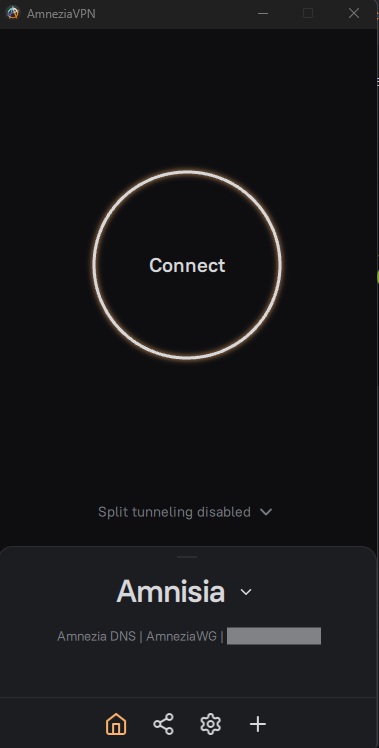
You are ready to go.
Ins0mniA
Useful scripts for VPS VPN Servers
Below there are some useful script that you can run to your Linux VPS or VPN or what ever Linux machine or server you have.
Unattended Upgrades Debian - Ubuntu
To install these packages, run the following command as root:
apt-get install -y unattended-upgrades apt-listchangesmore information at page Unattended Upgrades Debian - Ubuntu
Auto Update - Upgrade a Linux machine
The below script is to auto update - upgrade - remove - clean a Linux machine or Server.
Attachment Link os-update.sh
more information at page Auto Update - Upgrade a Linux machine
Empty ALL LOGs
The below script scan all files with extension .log then empty all log files.
Attachment Link empty_log_files.sh
more information at page Empty ALL LOGs on a Linux Server
Ins0mniA
Amnezia VPN Server settings
Download and update adblocker list for dnscrypt proxy
Creating the script
Open the terminal and type the below command :
nano update-adblocker.shand then copy / paste the below code inside the file "update-adblocker.sh"
#!/bin/bash
# Name: update-adblocker.sh
# Purpose: Download and update adblocker list for dnscrypt proxy
# Usage: Call it from the CLI or cron job https://www.cyberciti.biz/faq/how-do-i-add-jobs-to-cron-under-linux-or-unix-oses/
DEST="/etc/dnscrypt-proxy/blocked_names.txt"
#
# Blocks both adware + malware
# See for other lists https://github.com/StevenBlack/hosts
#SRC="https://raw.githubusercontent.com/StevenBlack/hosts/master/alternates/gambling-porn/hosts" Hosts 224.828
#SRC="https://hosts.ubuntu101.co.za/hosts" Hosts 698.866
#SRC="https://download.dnscrypt.info/blacklists/domains/mybase.txt" Hosts 465.625
SRC="https://hosts.ubuntu101.co.za/hosts"
TMP_B_FILE="$(mktemp)"
TMP_B_FILE_SORTED="$(mktemp)"
wget --timeout=10 --tries=5 -qO- "${SRC}" | grep -Ev "(localhost)" | grep -Ev "#" | sed -E "s/(0.0.0.0 |127.0.0.1 |255.255.255.255 )//" >> "${TMP_B_FILE}"
awk '/^[^#]/ { print $1 }' "${TMP_B_FILE}" | sort -u > "${TMP_B_FILE_SORTED}"
cp -f "${TMP_B_FILE_SORTED}" "$DEST"
rm -f "${TMP_B_FILE}" "${TMP_B_FILE_SORTED}"
sleep 5
systemctl restart dnscrypt-proxy.service
then press Ctrl + x it will prompt you [ Save modified buffer? ] press y and enter
Make the script executable
After that you need to make the script executable, so you will write the below command :
chmod +x update-adblocker.shAdd the script to cron job to run automatically
To run the script daily follow the below steps, you can change according to your need.
crontab -ethen go at the end of the file and add the below line, change the your_path with your folder where the script is locate.
@daily /your_path/update-adblocker.shthen press Ctrl + x it will prompt you [ Save modified buffer? ] press y and enter
You are done the script in the location /your_path/os-update.sh it will automatically run daily.
Download the script update-adblocker.sh
Attachment Link update-adblocker.sh
Below is the settings for the script that it will run daily with cron job to auto update the DNS servers.
Ins0mniA
Settings dnscrypt-proxy.toml
This is a working example, copy / paste the below code inside your file dnscrypt-proxy.toml
# Empty listen_addresses to use systemd socket activation
listen_addresses = ['127.0.0.1:53']
#listen_addresses = ['127.0.0.1:53', '172.29.172.1:53', '172.17.0.1:53']
server_names = ['cloudflare']

## Manual ADD
ipv4_servers = true
ipv6_servers = false
dnscrypt_servers = true
doh_servers = true
require_dnssec = false
require_nofilter = true

# Server must not log user queries (declarative)
require_nolog = true
## How long a DNS query will wait for a response, in milliseconds
timeout = 2500
## Keepalive for HTTP (HTTPS, HTTP/2) queries, in seconds
keepalive = 30

#netprobe_timeout = 60

##########################
#        DNS cache        #
###########################
## Enable a DNS cache to reduce latency and outgoing traffic
cache = true
## Cache size
cache_size = 512
## Minimum TTL for cached entries
cache_min_ttl = 600
## Maximum TTL for cached entries
cache_max_ttl = 86400
## Minimum TTL for negatively cached entries
cache_neg_min_ttl = 60
## Maximum TTL for negatively cached entries
cache_neg_max_ttl = 600

[blocked_names]
blocked_names_file = '/etc/dnscrypt-proxy/blocked_names.txt'

#[query_log]
#  file = '/var/log/dnscrypt-proxy/query.log'

#[nx_log]
#  file = '/var/log/dnscrypt-proxy/nx.log'

[sources]
  [sources.'public-resolvers']
  urls = ['https://raw.githubusercontent.com/DNSCrypt/dnscrypt-resolvers/master/v3/public-resolvers.md', 'https://download.dnscrypt.info/resolvers-list/v3/public-resolvers                                    .md']
  minisign_key = 'RWQf6LRCGA9i53mlYecO4IzT51TGPpvWucNSCh1CBM0QTaLn73Y7GFO3'
  cache_file = 'public-resolvers.md'
You can change it according to your needs.
Ins0mniA
Settings for resolv.conf
Below is the correct setting of the file resolv.conf so all the DNS request to resolve through the DNScrypt-proxy.
The file is locate at the /etc/resolv.conf
Open the terminal and type the below command :
nano /etc/resolv.confRemove EVERYTHING inside that file OR just COMMENT all the lines by adding [ # ] at the beginning of each line.
Add the line below by copy / paste it inside the file "resolv.conf"
nameserver 127.0.0.1then press Ctrl + x it will prompt you [ Save modified buffer? ] press y and enter
Ins0mniA